

One easy mistake when tuning the JVM is to see an OutOfMemoryError and immediately start changing -Xmx, switching garbage collectors, or adjusting GC flags. In real applications, however, many heap problems begin with the way the application creates and retains objects during a particular workload.
We encountered this in a student fitness assessment project. The system was generally stable: API response times, CPU usage, and memory consumption showed no obvious problems during normal operation. At the end of the semester, however, schools uploaded large volumes of fitness results. The service would occasionally enter Full GC, requests would become progressively slower, and in severe cases it would fail with:
java.lang.OutOfMemoryError: Java heap spaceWe initially approached it as a JVM memory configuration issue. After using Arthas and heap analysis tools to understand what remained in memory, we found that the root cause was in the way the business workload was processed.
An OOM That Started with an Excel Import
The business process was straightforward. After conducting fitness assessments, schools uploaded student results through Excel files. Each student had more than a single score: the data included height, weight, lung capacity, a 50-meter run, sit-and-reach, standing long jump, pull-ups or sit-ups, and an endurance run.
The raw measurements could not simply be written to the database. The system first matched each result against the appropriate scoring standard, based on the student’s grade, sex, and test type. It then calculated individual test scores, applied the overall scoring formula, and assigned a performance level such as Excellent, Good, Pass, or Fail.
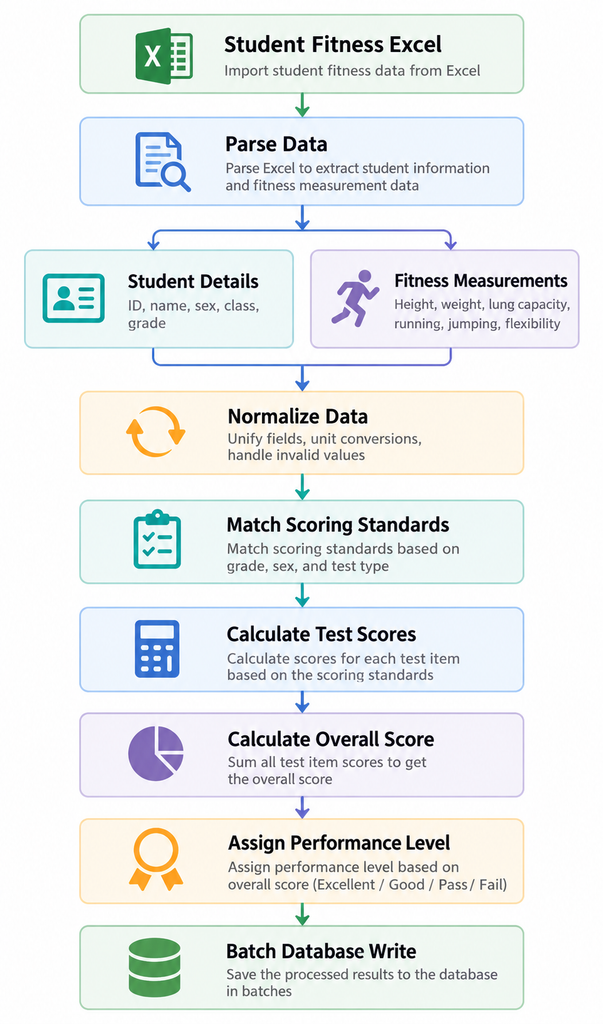
Figure 1. An uploaded row passes through several business transformations before its results can be stored.
For one student, this was a small amount of work. The difficulty came from processing many students together.
Consider an illustrative import containing 5,000 students, each with more than a dozen fitness-related fields. Parsing and processing that file could create Excel data structures, student objects, individual test results, scoring contexts, intermediate calculations, and final evaluation objects.
If the entire file moved through the pipeline as one large operation, the JVM was handling much more than “5,000 students.” It could be holding tens of thousands of related Java objects, with several representations of the same underlying data alive at once.
A single teacher uploading a file might not expose the problem. At the end of the semester, multiple schools and classes uploaded results around the same time. Imagine four overlapping imports containing 5,000, 6,000, 4,000, and 5,000 students. The memory requirements of those tasks would accumulate inside the same application.
That made the failure difficult to reproduce consistently. It depended on file size, the number of overlapping tasks, and how their allocation and object lifetimes interacted with garbage collection.
Looking at What the JVM Was Actually Doing
The first question was an understandable one: had we simply allocated too little heap?
For example, changing:
-Xms2g -Xmx2gto:
-Xms4g -Xmx4gmight make an immediate failure disappear. These settings illustrate the sizing decision rather than document the exact configuration of the incident.
A larger heap can be the correct choice when an application’s legitimate working set needs more space. But it does not answer the more useful diagnostic question: what is occupying the heap?
If batch size and concurrency remain uncontrolled, additional memory may only postpone the next failure.
We therefore used Arthas to observe the running JVM before continuing to change parameters. We started with the overall process rather than a particular method. The dashboard command provided an overview of threads, CPU usage, memory, and GC activity.
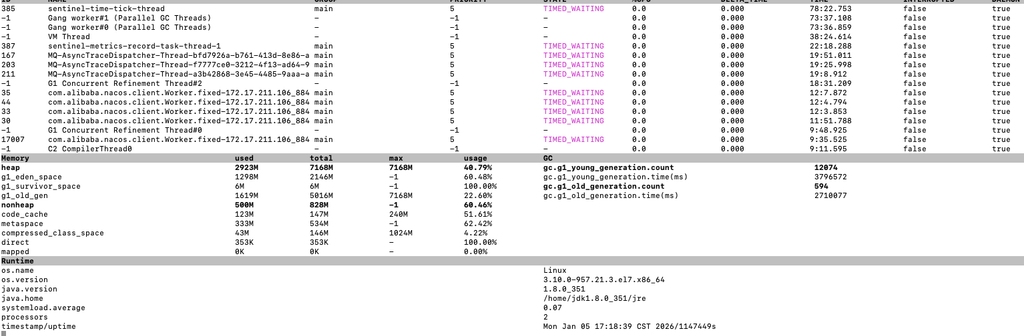
As import tasks progressed, old-generation occupancy continued to rise and GC activity increased. Short-lived objects can normally become eligible for collection quickly. Objects still reachable through an active batch, however, cannot be reclaimed simply because the application is running low on memory.
The investigation began to shift from “Why did the JVM run out of memory?” to “Why are these objects still alive after GC?”
Frequent Young GC Was Not the Whole Story
Young collections are a normal part of an allocating Java application. With a generational collector, many temporary objects are allocated in the young generation and disappear during subsequent collections. Frequency alone is not enough to diagnose a problem; pause duration, allocation rate, and application impact also matter.
The more concerning pattern was that memory usage remained high after collection.
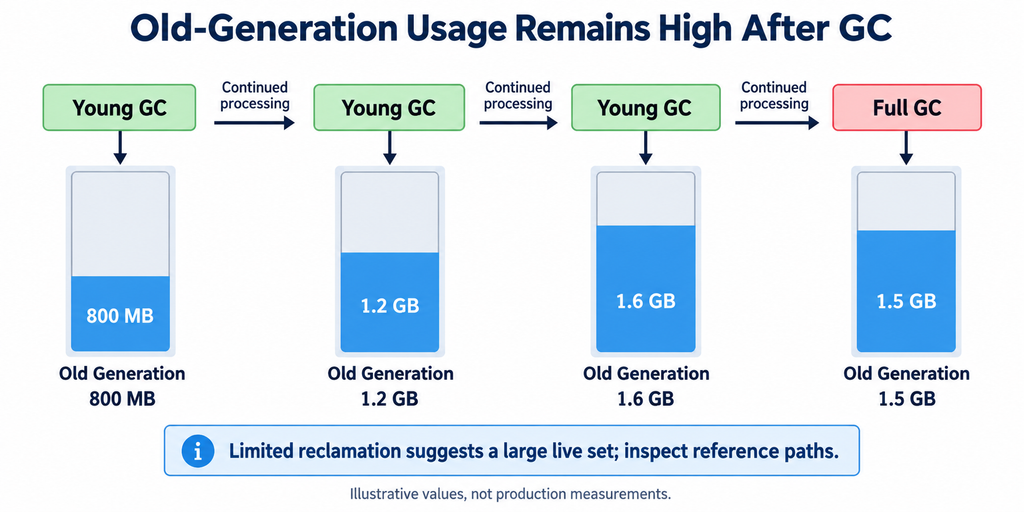
Figure 2. The values illustrate the trend and are not production measurements. Collection terminology and behavior depend on the collector in use.
GC was running, but it was reclaiming relatively little of the occupied space.
A small reduction after Full GC is a reason to investigate the live set and its reference paths. It does not, on its own, establish whether the application has a memory leak.
An OOM does not necessarily mean that a static map grows forever or that a ThreadLocal was never cleared. An application can also exhaust its heap by retaining too much legitimate in-flight data. Reachability alone does not distinguish those cases; the purpose and lifetime of the references matter.
Our investigation pointed to the latter problem. The batch-processing pipeline kept data available for later stages, allowing many business objects to remain live over an extended processing window.
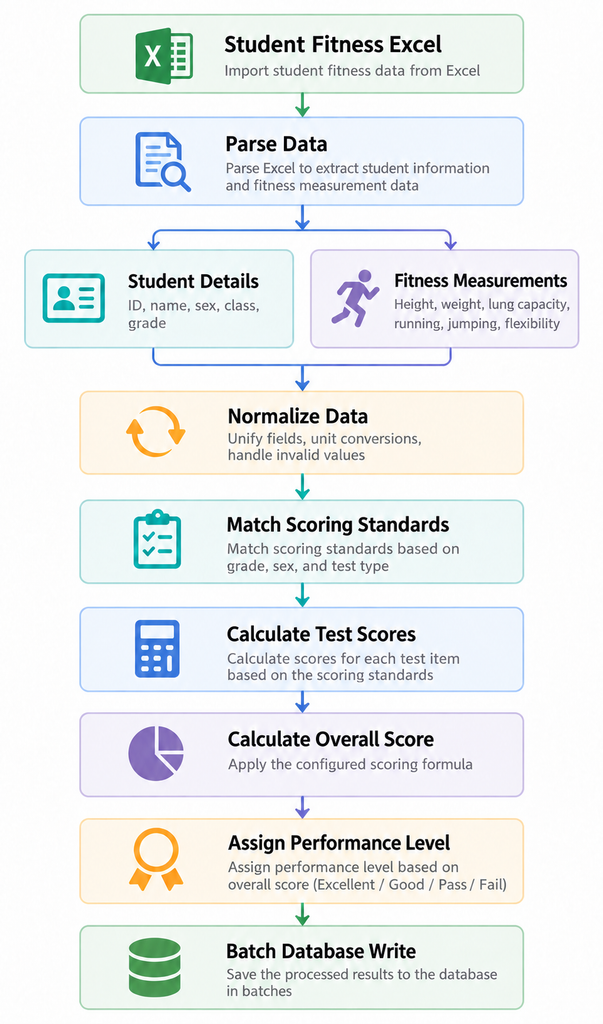
Figure 3. Overlapping object lifetimes can make the live working set grow even when each individual object is relatively small.
Using Arthas to Connect JVM Symptoms to Business Code
Once we saw that memory was not being reclaimed sufficiently, GC counts alone could not take the investigation much further. We needed to identify the work in progress and understand which references were retaining the data.
Arthas helped us inspect runtime activity, threads, and the relevant business methods. Heap analysis supplied the evidence about object retention.
The memory command showed usage across the memory pools exposed by the JVM:
memoryTo inspect busy threads, we could use:
thread -n 3Once the scoring service was identified, method monitoring helped connect the workload to its execution behavior:
monitor com.example.service.ScoreCalculateService calculateThis exposed invocation statistics such as call count, success rate, and response time. To investigate where a particular invocation spent its time, we could trace the method:
trace com.example.service.ScoreCalculateService calculateThe class name here is a placeholder for the application’s actual scoring service.
Commands such as trace and watch need a narrow scope on a busy production system. Instrumenting frequently called methods without limits can add overhead to the workload being investigated.
These commands also have a specific role: they help explain execution, not the complete object graph. A slow calculation method is not proof that it retains most of the heap.
For that, we turned to heap dumps. One way to capture a live-object dump is:
jmap -dump:live,format=b,file=/tmp/heap.hprof <pid>A live heap dump can trigger collection and pause the application, so it should be treated as an operationally significant diagnostic action.
The JVM can also be configured to attempt a heap dump when it encounters an OOM:
-XX:+HeapDumpOnOutOfMemoryError
-XX:HeapDumpPath=/data/logs/heapdump/
The destination must be writable and have sufficient space for the dump.
Tools such as Eclipse MAT and VisualVM can then help answer the questions that runtime monitoring leaves open: which classes account for large populations of objects, which structures dominate retained memory, and which reference paths keep those structures reachable.
The distinction between shallow heap and retained heap was particularly useful.
A StudentScore instance might be small in isolation. A list holding many such instances can nevertheless retain a much larger graph, because each student result refers to test results, calculation data, and other associated objects. Whether the list exclusively retains those objects depends on the other references in the graph.
The useful question was therefore not just “How large is this object?” It was “Which reference is keeping this entire group of objects alive?”
The Problem Was Not One Exceptionally Large Allocation
As the investigation progressed, we did not find a single enormous business object whose own storage explained the failure.
What we found was closer to the shape of the business itself. A student had several categories of related information:
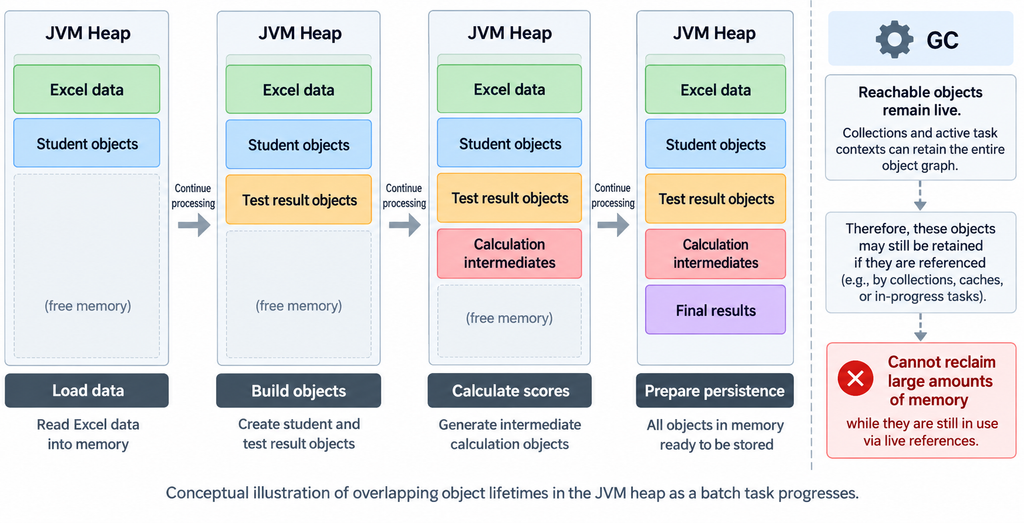
Figure 4. A conceptual view of the data associated with a student, rather than a measured Java object layout.
The processing pipeline also produced representations for different stages:
Excel Row
  → StudentImportDTO
  → PhysicalTestData
  → ScoreCalculateContext
  → ProjectScore
  → StudentTotalScore
  → EvaluationResult
This is a conceptual processing sequence, not a claim that every object directly references the next one.
If processing one student involves dozens of related objects, thousands of students create a substantial object population. Several concurrent imports multiply that population again.
Object count alone does not establish memory consumption; object sizes and overlapping lifetimes determine how much heap is required. In our case, the important finding was that those lifetimes overlapped across the batch.
A collection could therefore have a large retained heap even though no individual student record had a large shallow size.
The failure came from too many business objects remaining alive at the same time. Changing a GC parameter would not, by itself, remove the references that kept them there.
Why Increasing Xmx Was Not the Final Answer
We did consider allocating more heap. There is nothing inherently wrong with that. When the machine has sufficient capacity and the application’s normal working set is genuinely larger, increasing heap size can be a sensible production adjustment.
The issue was how our workload scaled. Memory demand increased with the amount of imported data, the live data associated with each student, and the number of concurrent imports.
A rough model for the batch-related portion was:
Batch memory ≈ N × S × CHere, N is the number of students retained per task, S is the average live memory per student at the relevant stage, measured in bytes, and C is the number of overlapping tasks.
This is an approximation. It leaves out the application’s baseline heap, shared data, parser buffers, and queued work. It also assumes the tasks are in sufficiently similar phases for the estimate to be useful.
For a bounded pipeline, the relationship can be expressed more explicitly:
Peak heap ≈ baseline heap
          + concurrent batches × rows per batch × live bytes per row
          + parsing and queue buffers
The model explains why changing only heap capacity was not our main solution. More students per file or more concurrent imports could consume the extra headroom again.
A larger heap changes the operating space available to the collector, but it does not shorten object lifetimes. The cost of collection depends on the collector and workload; heap size alone does not determine pause duration.
What we needed to change was the peak live working set.
The Most Important Change Was in Batch Processing
The eventual solution was straightforward. After an Excel upload, we no longer allowed the entire task to move through parsing, calculation, and persistence as one large operation. We split the work, used a queue to control processing, and limited the amount of data entering the calculation stage at once.
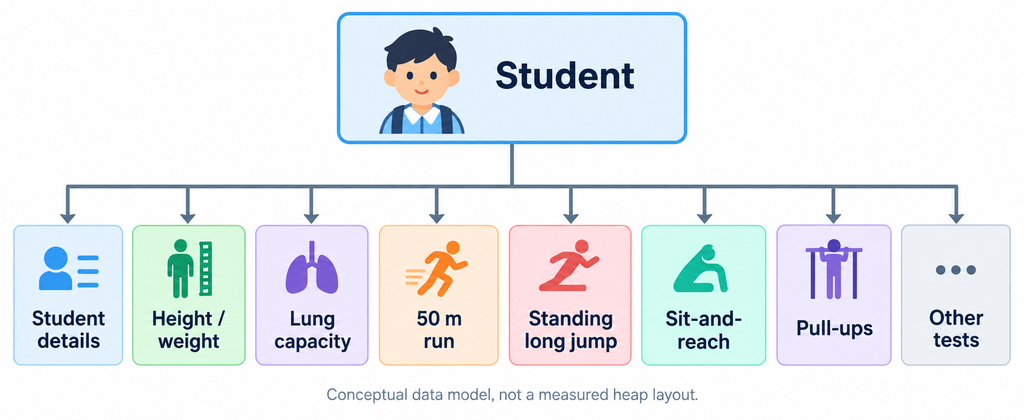
Figure 5. The objective is a bounded live working set. The memory curves are illustrative, and garbage collection is not a mandatory step between batches.
Queue implementation, batch sizing, and retry behavior belong to the task-processing design and are outside the scope of this account. For the JVM, the essential change was that we deliberately limited how much business data needed to be live at once.
There is an important qualification when applying this approach elsewhere. Splitting calculation into batches does not control the whole pipeline if the parser first builds a complete in-memory representation of the file. An unbounded queue holding fully populated student objects can create the same retention problem in another place.
Parser buffers, queued payloads, and worker concurrency therefore need explicit limits. Depending on the implementation, that may involve incremental parsing, bounded buffering, or queue entries that refer to stored files or task identifiers rather than carrying the entire object graph.
Those are conditions for controlling memory across the pipeline, rather than a claim that one particular queue or parsing library automatically provides it.
Once a batch had been processed and its data was no longer referenced, its objects became eligible for collection. They did not have to remain alive until every student in the file had completed every stage.
This did not require calling System.gc() after each batch, nor did it guarantee an immediate drop in reported heap usage. It gave the collector an opportunity to reclaim completed work during subsequent collections.
After the change, old-generation usage no longer kept climbing with the progress of the entire import in the same way, and peak memory consumption became more manageable.
What This Changed About My Approach to JVM Tuning
This incident changed how I think about JVM tuning. I became less inclined to begin with parameters and more interested in the application’s memory ownership.
When investigating java.lang.OutOfMemoryError: Java heap space, heap limits, GC behavior, memory-pool usage, and heap dumps are all important. Their value is that they reveal how the application uses memory.
The eventual fix may involve JVM configuration. It may also involve data structures, object references, caches, thread models, or batch-processing boundaries.
In this case, Arthas helped connect the JVM symptoms to the active business workload. Heap analysis then helped explain why the objects remained live. The collector was running, but the application retained too much data for too long.
Looking back, the design question became much simpler. Processing 5,000 students does not necessarily require holding every student’s complete calculation history in memory at the same time. If the business process allows the work to be divided, the application can operate with a much more stable working set.
When I encounter a similar memory problem now, I still check whether the heap is appropriately sized. But the question I want answered early is:
Why does all of this data need to exist in memory at the same time?
In many cases, that question leads closer to the cause than another JVM flag.
Related reading: Redis caching consistency in Java | Safe retries for OpenFeign order APIs