
A classroom can pass a health check and still degrade for users when retained Redis data grows, archival lags, or entry latency is measured from the wrong boundary.
This article focuses on the evidence needed to diagnose that gap: retention calculations, Redis memory signals, ClickHouse event definitions, and after-class backlog monitoring.
The architecture itself is background. I am not using this article to compare RTC vendors or redesign the interaction protocol; those are separate concerns. The goal is to turn a vague “the classroom felt slow” report into a bounded investigation with measurable definitions.
The original incident details are incomplete, so the examples below are investigation patterns and reproducible test shapes rather than a reconstructed production postmortem.
Classroom Data Has a Lifetime, Not Just a Write Rate
During an active lesson, we stored classroom messages in Redis for fast access. After the lesson ended, those messages were synchronized to the database for replay.
That design made retention part of the capacity problem.
A message is not finished consuming resources when its write completes. If the application retains it until the end of the lesson, it remains part of the active dataset. Multiple classrooms accumulate their own histories at the same time.
The amount retained therefore depends on more than incoming requests per second. Relevant factors include the number of concurrent classrooms, the frequency and size of classroom events, lesson duration, and the delay between course completion and data cleanup.
Two periods with similar request rates can have different memory requirements if one contains more long-running lessons or more unarchived history.
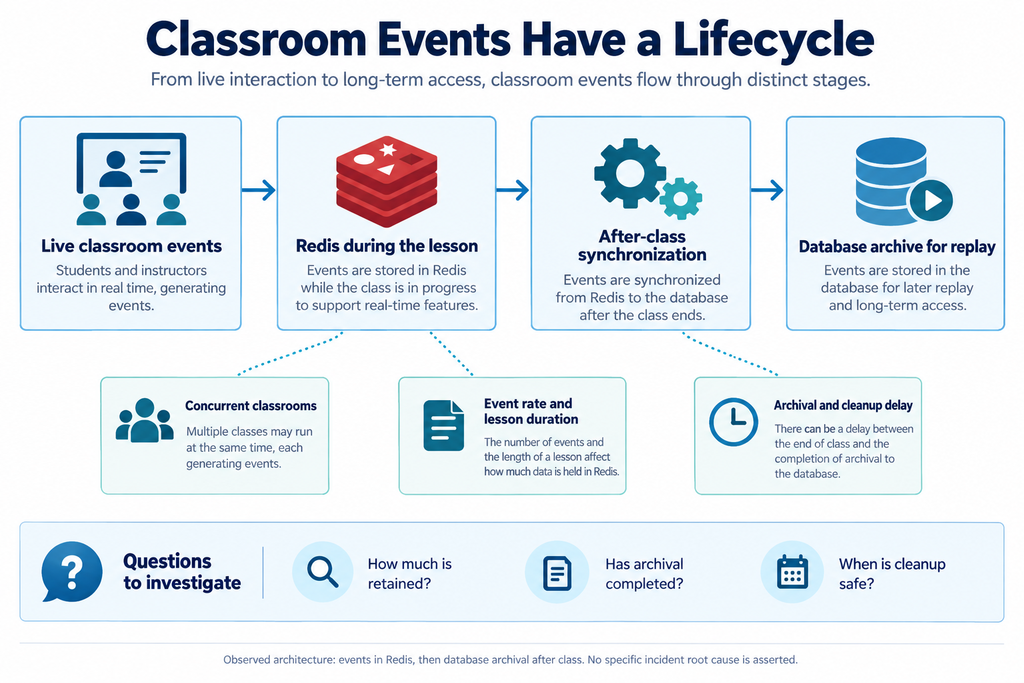
Figure 1. The implemented lifecycle stored events in Redis during class and archived them afterward. The lower callouts identify capacity questions, not confirmed causes of the remembered incident.
A rough way to think about the event data is the sum, across retained classrooms, of event count multiplied by stored event size. Actual Redis memory use also includes data-structure overhead, other application data, and operational buffers, so a payload-size calculation alone is not a capacity measurement.
This perspective changes the questions I would bring to an investigation. How much data belongs to active lessons? How much belongs to finished lessons awaiting archival? Are some event types significantly larger or more frequent than others?
It also raises a retention question: does every event need the same lifetime? A final annotation and a transient interaction preview may have different historical value. That distinction requires a deliberate business decision; it should not be introduced through an emergency cleanup that removes information needed for replay.
These are useful investigation paths. They do not establish which one caused the Redis issue I remember.
Estimate retained data before tuning Redis
Before changing a Redis limit, I would make the retained payload visible with a rough estimate:
retained_payload ≈ active_classrooms
                   × events_per_class
                   × average_event_bytes
For example, 60 active classrooms × 3,000 retained events × 400 bytes is about 72 MB of payload. Redis memory will be higher because of object and data-structure overhead, replicas, buffers, and unrelated keys, so this is an investigation starting point rather than a capacity number.
redis-cli INFO memory
redis-cli MEMORY USAGE classroom:lesson-1042:events
The commands are useful only when the key pattern and sample key are known. A single large key does not describe the whole dataset; pair sampled key sizes with counts by lifecycle state and event type.
Redis Availability and Redis Capacity Are Different Concerns
Our environment used Redis Sentinel, with the operational setup managed by the operations team.
From an application developer’s perspective, the important distinction is that failover and capacity management solve different problems. Providing another Redis node does not remove the application’s obligation to understand how much data it retains.
It also matters what “Redis ran out of memory” means in a particular report. Reaching a configured memory limit, receiving a rejected write, observing key eviction, and losing a process are different events.
Redis applies its configured eviction policy when the relevant memory limit is reached. With noeviction, commands that require additional memory can be rejected rather than making room by evicting keys. The application symptoms therefore depend on both configuration and workload. Redis key-eviction documentation
Without the original logs and configuration, I cannot identify which behavior occurred in our case.
There is a separate durability boundary in the classroom design. Before the after-class archive completes, data held only in Redis is not merely a disposable copy if losing it would damage replay.
Sentinel supports monitoring and failover, but it does not make every acknowledged write immune to loss. Redis documents that its replication and failover behavior can leave a window in which acknowledged writes are lost. Redis Sentinel documentation
For the backend, these distinctions lead to practical responsibilities. Connection errors must be handled. A retry must not accidentally duplicate a business event. An interrupted archival task needs a recoverable outcome.
They also define useful questions for operations: which errors did the clients see, which limits were reached, and did the event coincide with a role change or a resource-pressure signal?
Those questions are more actionable than assuming that every Redis exception is a failover problem—or that failover will fix every Redis problem.
ClickHouse Helped Us Look at the Classroom Experience
Our ClickHouse-backed dashboards added a business-facing view of the system. We used them to examine core-chain timings, how long users took to enter classrooms, whether interruptions occurred, and whether users requested help.
These signals answered a different question from server monitoring: what was happening during the lesson experience?
Entry duration is a good example. A fast backend response does not necessarily mean a student is ready to participate. Authentication, application connections, media establishment, and courseware loading can all contribute to the journey.
The meaning of “entered the classroom” therefore needs a clear definition. A page becoming visible, a Socket connection opening, and usable teacher audio arriving are different milestones.
When extending such a dashboard, I would name the measured boundary explicitly and separate intermediate timings where instrumentation supports it. A single number called “entry latency” can otherwise hide several different behaviors.
Make an experience metric reproducible
A dashboard becomes easier to review when its event boundary is visible in the query. The following ClickHouse example assumes an illustrative classroom_events table with one row per entry attempt:
SELECT
    toStartOfHour(event_time) AS hour,
    count() AS attempts,
    countIf(outcome = 'completed') AS completed,
    quantile(0.95)(duration_ms) AS p95_entry_ms
FROM classroom_events
WHERE event_time >= {from}
  AND event_time < {to}
  AND event_name = 'class_entry'
GROUP BY hour
ORDER BY hour;
The query does not prove why a session failed. It does make the denominator, completion definition, and percentile explicit, so a later comparison can be reproduced instead of relying on a screenshot of a chart.
Failed attempts also matter. If a latency chart includes only successful entries, users who time out or leave before completion may disappear from the calculation. A useful view should pair duration with completion, failure, and abandonment information where available.
Interruptions require similar care. A brief network transition and a sustained loss of classroom functionality should not automatically be counted as equivalent events. Definitions determine what the chart can support.
Help requests add another kind of evidence. They show that a user chose to ask for assistance, but they do not establish a technical failure by themselves. A request may concern audio, lesson controls, courseware, or something unrelated to infrastructure.
The reverse is also true: no help request does not prove a problem-free lesson. A student may tolerate a short interruption, ask the teacher verbally, or leave without reporting anything.
These limitations do not make experience metrics less useful. They make their interpretation more precise.
For comparisons over time, raw counts also need context. More interruptions during a period with many more lessons do not necessarily mean reliability deteriorated. Rates should use a denominator that matches the question, such as observed sessions or participant time, with the definition kept consistent.
The ClickHouse dashboards and the Redis message archive served different purposes. One supported analysis of classroom behavior; the other held interaction history for the live-session and replay lifecycle. They should not be treated as one interchangeable store simply because both involve classroom events.
Logs, Experience Metrics, and Infrastructure Signals Explain Different Parts
We had ELK, Zabbix, and Prometheus in the environment, but I did not own their full deployment or operational configuration. The useful lesson from the development side was how their evidence could complement the classroom view.
A dashboard can help identify a pattern: entry took longer during a particular interval, interruptions appeared, or users asked for help.
Application logs can help examine execution details: which operation failed, what exception was recorded, or whether a task reached a particular step.
Infrastructure monitoring can provide context about resource pressure, service availability, or changes observed by the operations team.
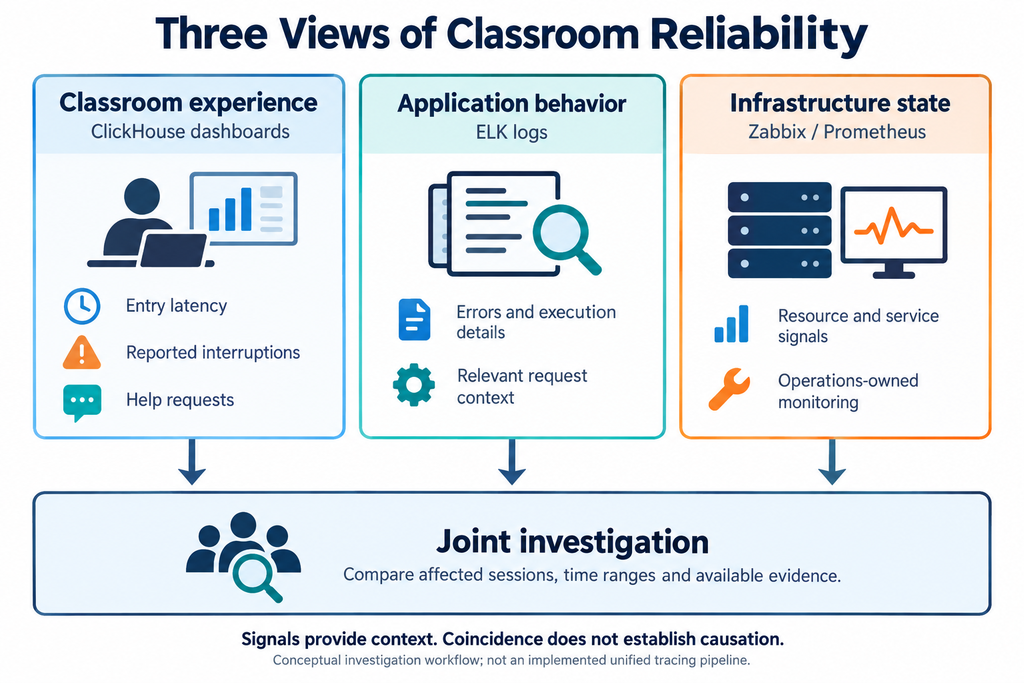
Figure 2. These are complementary investigation views. The diagram does not imply that the project had an automatically correlated, end-to-end tracing pipeline.
I would not assign Zabbix and Prometheus rigid roles based only on their names. Their practical coverage depends on what the operations team configured. For a developer, knowing which signals exist and whom to involve is more useful than claiming ownership of a monitoring stack one did not maintain.
A productive investigation begins with a bounded question. Which classrooms or users were affected? During what interval? What action were they trying to complete?
Classroom identifiers, session identifiers, timestamps, and request context can help connect that question to logs where those fields are available. If a common identifier is missing, that is an observability gap to improve—not evidence that a complete trace can be reconstructed.
Time deserves attention too. Client event time, backend processing time, and analytics ingestion time may differ. Delayed telemetry can make an event appear later than the user experienced it, and device clocks can be inaccurate.
A rise in Redis memory and a rise in classroom interruptions during the same period would be a lead, not a completed root-cause analysis. Establishing a connection requires evidence that the affected application operations depended on the behavior observed.
In particular, I do not have that evidence for the old incident. I would not use the existence of our dashboards to claim that they identified its cause.
The value of the combined view is that it supports better questions and narrower investigations. It does not replace reasoning about the actual request path.
A Lesson Can Finish Before Its Backend Work Is Complete
The classroom’s visible end was not the end of its data lifecycle.
Because messages were synchronized from Redis to the database after class, archival remained a business operation after the teacher and students had left. A lesson could appear successful in real time while its interaction history was still waiting to be preserved.
This is an important distinction for monitoring. Service uptime and successful classroom entry do not establish that after-class processing completed.
For a system with this architecture, I would want visibility into unfinished archival work, the age of that work, failures, and whether a retry can complete it without duplication. These are monitoring requirements suggested by the lifecycle, not claims about metrics that were present in our original dashboards.
Cleanup has to respect the same boundary. The scheduled end of a lesson is not equivalent to confirmed archival. Removing retained messages too early can damage replay; retaining them indefinitely can contribute to memory growth.
The application and operations teams need a shared understanding of that tradeoff. Operations can observe memory pressure, but application developers must explain which data is safe to remove and which pending work still depends on it.
The monitoring path itself should also be reviewed as a dependency. Experience reporting should not create an unbounded backlog in the classroom application when the analytics destination is unavailable. Buffering, retry limits, and acceptable telemetry loss need explicit decisions.
Missing telemetry should remain visible as missing telemetry. It should not be interpreted as proof that a session had no interruptions.
A useful review of the platform would therefore cover several distinct outcomes:
| Outcome | What needs to be established |
|---|---|
| A participant entered successfully | The chosen entry milestone was reached, not merely that an API returned successfully. |
| A lesson remained usable | Available interruption signals and user feedback support that conclusion. |
| A dependency recovered | Application operations resumed, rather than only the process or node becoming healthy. |
| A lesson was archived | The required history reached persistent storage and incomplete work remains recoverable. |
Reproduce a Retention and Backlog Warning
Run this as a staging drill with illustrative values, then compare the measurements with the limits used by the production service. The point is to make the warning observable at the same boundaries as the classroom workflow.
| Signal | Staging test | Expected evidence |
|---|---|---|
| Redis retention | Seed active and completed classroom event keys, then hold archival for a known interval. | Active classrooms, retained events, average bytes, used_memory, and eviction or rejected-write counters. |
| ClickHouse entry boundary | Emit a class_entry event at each agreed milestone and run the example query. | Attempt count, completed count, denominator, p95 duration, and the event definition used. |
| Archival delay | Pause the archive worker after a lesson ends and resume it after the backlog ages. | Oldest pending job, retry count, duplicate handling, and completion time. |
| Dependency degradation | Exhaust the allowed Redis capacity or make the analytics destination unavailable. | Student-visible behavior, application error, queue growth, and recovery result. |
Record the same identifiers across the drill: classroom, lesson, archive job, event range, and timestamp. A graph showing memory pressure without the corresponding user or backlog evidence is a lead for investigation, not a root cause.
A review checklist for the next incident
- Which classroom, lesson, and participant identifiers define the affected population?
- How much Redis data belongs to active lessons, finished lessons, and pending archival?
- Which entry milestone and denominator does the experience metric use?
- Can the archive retry safely after a process restart or duplicate delivery?
- Which observation comes from logs, which from metrics, and which remains unknown?
This is where I see the strongest contribution from backend development. Infrastructure teams can keep services available and provide operational evidence. Developers can connect those services to classroom meaning: which action failed, what data remains pending, and what recovery needs to accomplish.
My recollection of the Redis issue is incomplete, so it cannot support a detailed incident narrative. The implemented architecture and monitoring practices still support a clear lesson.
Classroom reliability has to be observed across time: while a user enters, while the lesson runs, and while its history is archived afterward. ClickHouse dashboards helped expose the experience layer; application logs and operational monitoring provided other parts of the picture.
A server being up is valuable evidence. It is simply not the same as a student being able to continue the lesson.
For the recovery boundaries between media and courseware, see Online Classroom High Availability: Media Failover and Courseware Fallback. For message ordering, deduplication, and reconnect snapshots, see Cross-Region Classroom Messaging.