

When a model returns a tool call, three separate decisions follow: should the request be accepted, is this caller allowed to use the tool, and what happens if the same request arrives again?
This article uses Spring AI 2.0.1 and a scripted local model to trace one order-status request from structured tool call to Java method and back to the model.
The useful boundary is application-side execution. The model proposes a tool name and arguments; Spring AI resolves a callback; the service decides whether the operation is permitted and how its result is returned.
The first fixture is read-only so the round trip stays deterministic. The later cases use the same boundary to show rejection, permission checks and duplicate execution.
The Question: Who Actually Executes the Method?
A tool-capable model can return something conceptually equivalent to:
{
  "id": "call-1",
  "name": "orderStatus",
  "arguments": {
    "orderId": "ORD-42"
  }
}
This is a simplified explanation of the fields, not a provider-specific HTTP payload. In Spring AI’s AssistantMessage.ToolCall, the arguments are represented as a JSON string.
The model has proposed an operation. No order lookup has happened merely because that proposal exists.
Execution happens inside the application when a registered callback is selected and invoked. This is where application permissions, parameter validation and service behavior must remain effective.
The Source Landmarks
| Source | Area to inspect | Responsibility |
|---|---|---|
| DefaultChatClient | autoRegisterToolCallingAdvisor() |
Adds the tool-loop advisor unless disabled or already supplied |
| ToolCallingAdvisor | adviseCall() |
Repeats downstream model calls and handles tool results |
| DefaultToolCallingManager | executeToolCalls() and callback selection |
Resolves and executes the requested callback |
| MethodToolCallback | call(), argument building and method invocation |
Converts arguments, invokes Java and converts the result |
The version matters. This article describes the 2.0.1 advisor-based loop; do not apply its class-level execution map unchanged to a 1.x application.
Follow One Complete Interaction
The model and the Java tool have different jobs. The model requests an operation; application-side code executes it. This diagram shows the successful path used in our example.
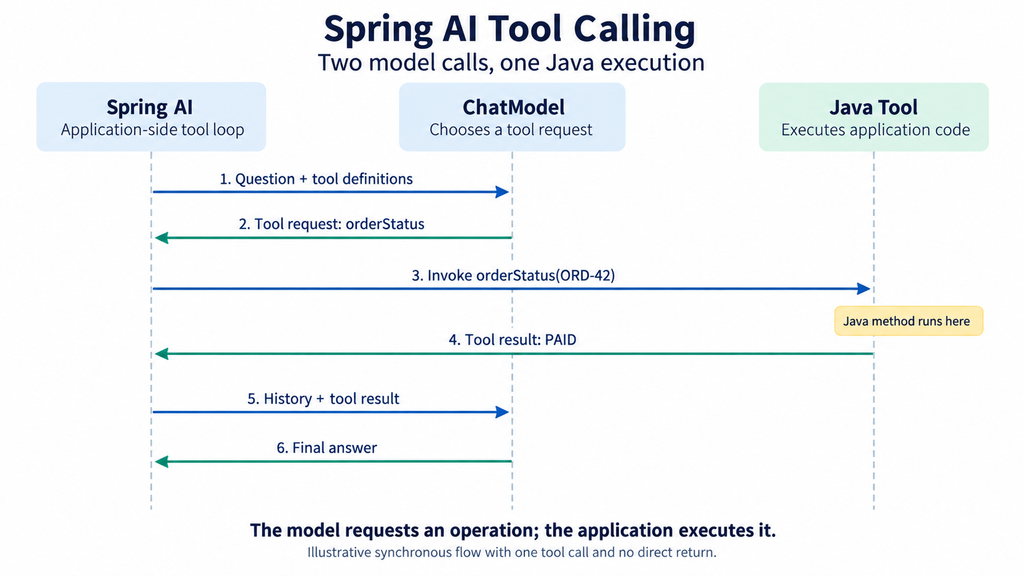
Figure 1. One client interaction makes two model calls and one Java tool invocation. This simplified synchronous flow excludes direct-return tools, retries and failures.
Read the diagram from top to bottom. There is no direct model-to-Java connection. Spring AI processes the structured request and returns the tool result to the model.
Define a Read-Only Tool with an Observable Effect
The example tool increments a counter so the test can prove that Java execution occurred:
static final class OrderTools {
    int calls;

    @Tool(description = "Read the status of an illustrative order")
    public String orderStatus(String orderId) {
        calls++;
        if (!"ORD-42".equals(orderId)) {
            throw new IllegalArgumentException("Unknown example order");
        }
        return "PAID";
    }
}
The counter is test instrumentation. The hardcoded order is also a fixture, not an example of production authorization or database access.
The example project compiles with Java parameter names enabled so that orderId is available when constructing and invoking the method-based tool.
What .tools(tools) Registers
An annotated method has two relevant representations:
| Representation | Purpose |
|---|---|
| Tool definition | Describes the tool name, purpose and expected arguments for the model integration |
| Tool callback | Holds the application-side behavior that can execute the operation |
In the object-based registration path, DefaultChatClient delegates annotated objects to ToolCallbacks.from(...). MethodToolCallbackProvider discovers eligible annotated methods and builds callbacks containing the method, target object, definition, metadata and result converter. ToolCallbacks source, MethodToolCallbackProvider source
The model integration exposes a tool description and argument schema; it does not send an executable Java object to the model. Merely adding @Tool somewhere in the codebase also does not demonstrate that a particular request has registered that object.
With a real tool-capable model, the descriptions help it decide whether to request a tool. Registration alone does not guarantee that it will do so.
Script the Model’s Two Responses
On the first invocation, the local model returns a tool call. On the second, it returns a final assistant message:
List<Prompt> requests = new ArrayList<>();

ChatModel model = new ChatModel() {
    @Override
    public ChatOptions getOptions() {
        return ToolCallingChatOptions.builder().build();
    }

    @Override
    public ChatResponse call(Prompt prompt) {
        requests.add(prompt);

        AssistantMessage output = requests.size() == 1
                ? AssistantMessage.builder()
                    .content("")
                    .toolCalls(List.of(new AssistantMessage.ToolCall(
                            "call-1", "function", "orderStatus",
                            "{\"orderId\":\"ORD-42\"}")))
                    .build()
                : new AssistantMessage("Order ORD-42 is paid.");

        return new ChatResponse(List.of(new Generation(output)));
    }
};
The model returns tool-capable options because the advisor checks the prompt’s options type. A generic test double with only plain chat options does not exercise this tool loop.
This scripted model does not decide whether a tool is appropriate. That decision is fixed in the fixture so the application-side round trip can be tested deterministically.
Run One Client Interaction
Register the tool object and submit the question:
var tools = new OrderTools();

String answer = ChatClient.builder(model)
        .build()
        .prompt()
        .options(ToolCallingChatOptions.builder())
        .tools(tools)
        .user("What is the status of ORD-42?")
        .call()
        .content();
In the 2.0.1 API used here, the request-level options(...) call receives an options builder. The test model also supplies a tool-capable options type through getOptions().
The executed assertions established:
Client interactions:       1
ChatModel.call invocations: 2
orderStatus invocations:   1
Tool response ID:          call-1
Final content:             Order ORD-42 is paid.
The second model request contained a ToolResponseMessage whose result included PAID. Its ID matched the model’s call-1 request.
That is the important evidence. The final sentence was scripted, so it is not proof that a real model will faithfully describe any tool result. The test verifies dispatch, Java execution and the return path.
Inspect the Messages on the Second Model Call
The useful evidence is not just the final answer. In this fixture, the second prompt contains this message sequence:
USER
  What is the status of ORD-42?

ASSISTANT — tool request
  id: call-1
  name: orderStatus
  arguments: {"orderId":"ORD-42"}

TOOL — tool result
  id: call-1
  name: orderStatus
  result includes: PAID
This is a readable summary of Spring AI message objects, not an exact provider payload. There is no conversation-memory advisor in this fixture; the tool loop carries the messages needed for the current interaction.
The matching ID associates a result with its tool request. The assistant tool-request message and the tool-result message play distinct roles, even if a logging system flattens both into strings.
When debugging, check both the recorded invocation and the next prompt. A correct Java return value does not help generation if a custom integration fails to carry it back into the model conversation.
Trace the Source Path
The interaction has five distinct steps:
- The model receives the initial question and configured tools.
- It returns an assistant message requesting
orderStatus. - The tool manager selects the registered callback; the method callback converts the JSON argument and invokes Java.
- The framework adds the assistant tool request and tool response to the conversation used for the next round.
- The model receives that tool result and returns a final assistant message.
At the invocation boundary, MethodToolCallback.call() parses the JSON input, builds arguments for the Java parameters, invokes the target method and converts its return value to the tool-result representation. That conversion is distinct from the later model-generated answer. MethodToolCallback source
The model never executes Java bytecode. The backend does, under the authority available to the application and the invoked service.
The ordinary loop continues until a response has no tool calls. Other branches exist: a tool can be configured for direct return, and configured tool-call limits can stop further execution. Those branches are source-reviewed here but are not exercised by this two-round test.
Reject a Tool Call Before Execution
A tool request is a proposal, not an instruction that must run. If the callback is missing, the arguments fail validation or policy denies the operation, the application should stop at the execution boundary and return a structured result.
The following wrapper is application code, not a Spring AI type. It makes a rejection visible in a test:
record ToolOutcome(String status, String code, String message) {}

ToolOutcome readOrder(String actorId, String tenantId, String orderId) {
    if (!permissionService.canReadOrder(actorId, tenantId, orderId)) {
        return new ToolOutcome(
                "rejected", "ORDER_FORBIDDEN",
                "The caller cannot read this order");
    }
    return new ToolOutcome(
            "ok", "ORDER_STATUS",
            orderService.status(tenantId, orderId));
}
The model may receive the rejection as tool-result data and explain it, but it cannot turn a denied result into a successful lookup. Keep stack traces, SQL and internal customer data out of that result.
For an unknown tool name or malformed JSON, record the failure and stop the loop according to product policy. The test should prove that the callback did not run:
assertEquals(0, tools.calls);
assertEquals("ORDER_FORBIDDEN", outcome.code());
Permission Check Case: Same Tool, Different Caller
Registering orderStatus does not grant every caller access to every order. Resolve the actor and tenant from trusted application context, then pass those values into the service check. Do not accept a model-produced customerId or a sentence claiming that the caller is an administrator as proof of permission.
String actorId = requestContext.requiredUserId();
String tenantId = requestContext.requiredTenantId();
String requestedOrder = toolArguments.orderId();

ToolOutcome outcome = readOrder(
actorId, tenantId, requestedOrder);| Caller | Order | Expected decision |
|---|---|---|
| user-7 / tenant-acme | ORD-42 in tenant-acme | allow |
| user-8 / tenant-acme | ORD-42 owned by user-7 | reject with ORDER_FORBIDDEN |
| user-7 / tenant-beta | ORD-42 in tenant-acme | reject with TENANT_MISMATCH |
Log the decision with a request ID, actor, tenant, tool name and stable reason code. Return only the fields authorized for the caller. These checks belong in the service or policy layer, so they still apply when the tool is invoked by a retry, a different advisor or a non-chat client.
Duplicate Execution: Replay the Same Tool Call
A single client interaction can contain multiple model rounds, and a network retry can replay a tool request after the first execution has already completed. The visible symptom is simple: the same business operation appears twice even though the user clicked once.
Use a business idempotency key at the service boundary. This small test double shows the decision; a production implementation needs a durable store or a database uniqueness constraint.
Set<String> processed = ConcurrentHashMap.newKeySet();
AtomicInteger writes = new AtomicInteger();

String executeOnce(String tenantId, String requestId,
                   Supplier<String> action) {
    String key = tenantId + ":" + requestId;
    if (!processed.add(key)) {
        return "DUPLICATE_SKIPPED";
    }
    writes.incrementAndGet();
    return action.get();
}
assertEquals("PAID", executeOnce(
"tenant-acme", "status-42", () -> "PAID"));
assertEquals("DUPLICATE_SKIPPED", executeOnce(
"tenant-acme", "status-42", () -> "PAID"));
assertEquals(1, writes.get());The model’s tool-call ID links a request to its tool response inside one conversation. It is useful for tracing, but it should not be treated as a durable business idempotency key across retries, process restarts or regenerated conversations. For refunds, credits or other writes, persist the key with the business result before acknowledging completion.
Advisor Placement Affects What Repeats
The tool advisor invokes a copy of the downstream chain for model rounds. An advisor after the tool-loop advisor can therefore run more than once during one client interaction.
This matters for retrieval cost, diagnostic logs and stateful processing. A logger placed inside the loop can show each model round; a logger outside may see only the overall interaction.
The default memory/tool relationship is also intentional. Changing it can alter which intermediate messages are handled by memory. Review those choices with a tool-containing request rather than assuming the simple request trace from the previous Advisor article is the entire interaction.
Diagnose the Correct Failure
| Symptom | First check |
|---|---|
| The model describes a lookup but no Java method runs | Was there an actual structured tool call? |
| A tool call appears but is not executed | Tool-capable options, loop configuration and callback registration |
| A callback cannot be found | Requested name versus available callback names |
| Argument conversion fails | JSON shape, Java parameter types and parameter names |
| Java returns data but the final answer is wrong | Tool-response content and subsequent model response |
| An operation happens twice | Multiple rounds, retries and business idempotency |
Our local test covers the successful synchronous round trip. It does not test provider tool selection, streaming, concurrency, persistent side effects or authorization integration.
Run the Companion Example
The companion Maven project contains the complete imports and one focused JUnit test. It uses Java 17 and the following Spring AI dependency:
<dependency>
    <groupId>org.springframework.ai</groupId>
    <artifactId>spring-ai-client-chat</artifactId>
    <version>2.0.1</version>
</dependency>
The POM enables Java parameter names and supplies the test dependencies. From its example directory, run:
mvn testNo provider API key, Spring Boot application or external database is required. The fixture verifies the successful framework round trip; it does not evaluate whether a real model chooses the right tool or produces an accurate final explanation.