

A vector store can return three documents while the model receives none of the evidence you expected. A useful failure pattern is simple: the application log contains a document ID, but the answer is outdated or cannot identify its source.
For one request, capture four artifacts separately: the search request, the returned Document objects, the text added to the model prompt, and the claims in the final answer. A successful search proves only the first half of that path.
This walkthrough uses QuestionAnswerAdvisor in Spring AI 2.0.1 and a recording ChatModel to inspect the boundary between retrieved evidence and model context. It does not treat every Spring AI RAG component as interchangeable.
The fixture verifies context construction, not embedding quality or answer quality. For the preceding memory boundary, see Spring AI Chat Memory: Why Stored Messages May Not Reach the Model.
The Question: What Crossed Each Boundary?
Four different things are often conflated:
| Boundary | Evidence to capture |
|---|---|
| User question to search request | Actual query, filters, top-K and threshold settings |
| Search request to retrieved documents | Document IDs, text, scores where available and metadata |
| Retrieved documents to model prompt | The exact passages and source labels inserted |
| Model prompt to answer | Whether each important claim follows from those passages |
A nonempty list proves only that the search returned documents. It does not prove that those documents answer the question or that every field on the Document object became visible to the model.
Trace the Evidence, Not Just the Document Count
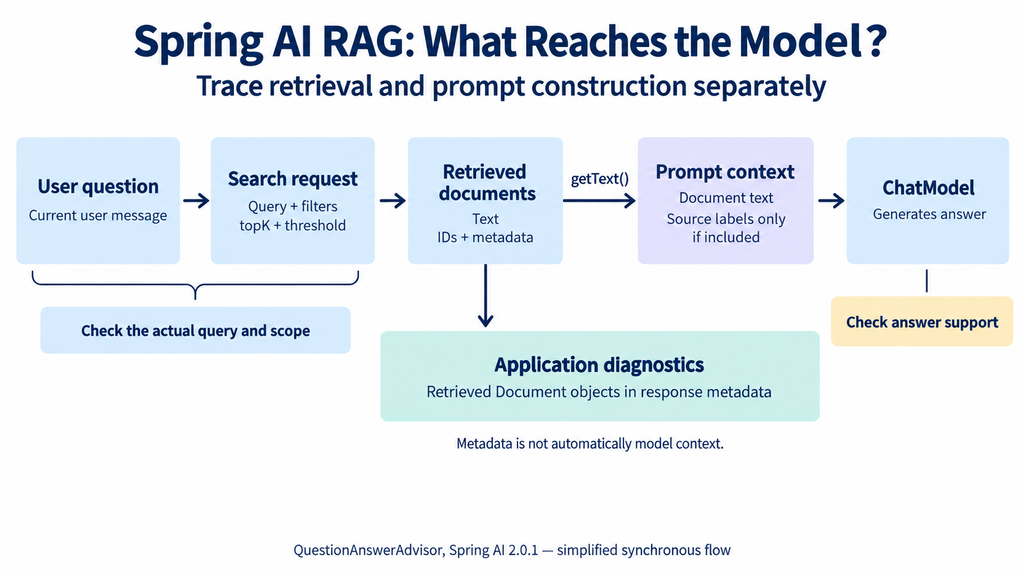
Figure 1. QuestionAnswerAdvisor builds model context from document text. Retrieved Document objects remain available separately in response metadata; arbitrary metadata fields do not automatically become prompt content.
The two paths serve different purposes. Application diagnostics can identify which documents were returned, while the model can reason only over the information actually supplied to it, together with its existing capabilities. A document count or source ID in a log does not prove that the corresponding evidence appeared in the prompt.
The Source Landmarks
| Source | Area to inspect | What it establishes |
|---|---|---|
| QuestionAnswerAdvisor | before(), doGetFilterExpression(), after() | Search construction, prompt augmentation and retrieval metadata |
| SearchRequest | Query and retrieval settings | The inputs passed to the vector store |
| Document | Text and metadata fields | The distinction between passage content and associated metadata |
In the selected advisor, before() derives the search query from the current user message, calls similaritySearch(), joins retrieved document text and renders an augmented user message. The retrieved Document objects are also retained in context and exposed through response metadata.
Those are separate outputs: text for generation and objects for application inspection.
Reproduce a Missing Source Label
Our controlled vector-store fixture returns this document:
Document document = Document.builder()
        .id("policy-2026")
        .text("Unused packages can be refunded within 14 days.")
        .metadata(Map.of(
                "source", "policy-2026",
                "tenant", "A"))
        .build();
The test double records the supplied SearchRequest and returns that one document. It does not calculate embeddings or implement a real tenant filter. This is deliberate: we want to isolate what the advisor does with a known result.
The client configuration is ordinary Spring AI code:
var advisor = QuestionAnswerAdvisor.builder(store)
        .searchRequest(SearchRequest.builder()
                .topK(3)
                .filterExpression("tenant == 'A'")
                .build())
        .build();

ChatResponse response = ChatClient.builder(model)
        .defaultAdvisors(advisor)
        .build()
        .prompt()
        .user("What is the refund window?")
        .call()
        .chatResponse();
Here, store is the controlled fixture and model records the prompt and returns ACK. The full fixture and assertions are included in the companion RagContextProbeTest.
The executed test established:
| Observation | Result |
|---|---|
| Captured search query | What is the refund window? |
| Configured top-K | 3 |
| Filter attached to request | Present |
| Refund passage present in outgoing user text | Yes |
Metadata-only source ID policy-2026 present in that text | No |
| Retrieved-document metadata present on the response | Yes |
The source ID existed in application data but was not in the text passed to the model. Asking the model to cite that exact ID would therefore be an unsupported expectation in this example.
Fix the Context Representation, Not Just the Prompt Wording
If an answer needs source labels, the model must receive those labels alongside the evidence.
For the controlled example, put an application-selected source label into the passage text returned by the fixture:
Document labelled = Document.builder()
        .id("policy-2026")
        .text("""
                [Source: policy-2026; section: Refunds]
                Unused packages can be refunded within 14 days.
                """)
        .metadata(Map.of("source", "policy-2026", "tenant", "A"))
        .build();
Run the same advisor with this document. The companion test confirms that both policy-2026 and the refund passage now appear in the model’s user message.
| Controlled fixture | Passage reaches model | Source label reaches model |
|---|---|---|
| Source stored only in metadata | Yes | No |
| Source explicitly included in document text | Yes | Yes |
This fixes evidence visibility. It does not prove that a real model will cite the source correctly: our model still returns the fixed text ACK.
In production, an application-controlled context-assembly stage can attach selected source labels after retrieval. That avoids changing embedding input solely for display purposes. The fixture above demonstrates the representation needed at the advisor boundary; it is not a prescription to rewrite every stored chunk.
For this advisor, changing only the prompt template does not automatically serialize arbitrary document metadata. Its question_answer_context input has already been assembled from document text. Use prepared text or a context-building implementation that explicitly selects the required metadata.
Keep source labels stable and application-generated. Then validate that returned citations reference the supplied evidence. A generated citation label is not proof that the accompanying claim is supported.
A Follow-Up Question May Be a Poor Search Query
Consider this conversation:
User: Compare the beginner package and the advanced package.
Assistant: ...
User: Can I refund the second one?
Searching only for “Can I refund the second one?” leaves the intended product unresolved.
In this advisor’s request path, stored history does not automatically become a standalone retrieval query. The advisor reads the current user message. Even if memory appears elsewhere in the prompt, the search query can remain ambiguous.
A query-rewriting stage could turn it into “What is the refund policy for the advanced package?” Preserve both the original question and the rewritten query when evaluating that stage. A rewrite that selects the wrong product creates a retrieval error before vector search begins.
This connects to advisor ordering in the second article, but ordering alone is not a substitute for an explicit rewrite operation.
Filters Need More Attention Than Their Presence in a Log
The example verifies that a filter was attached to the request. It does not verify that a specific vector database enforces it correctly.
The advisor also supports a filter expression supplied through request context. In this release, a nonblank context expression is used instead of the configured expression; it is not automatically combined with it.
A separate fixture test demonstrates this with a configured tenant filter and a request-level product filter:
client.prompt()
        .user("What is the refund window?")
        .advisors(a -> a.param(
                QuestionAnswerAdvisor.FILTER_EXPRESSION,
                "product == 'advanced'"))
        .call()
        .content();
The captured search expression is the product filter alone. The configured tenant == 'A' restriction is not automatically retained. This test checks the constructed request, not a real database’s filter enforcement.
That distinction matters if the configured filter includes a tenant boundary. Replacing it with a product filter can accidentally remove the tenant restriction.
Construct required scope from authenticated application state. Combine optional constraints with that scope under server control, then verify the final expression and actual store behavior. Do not accept a model-generated or user-supplied filter as the authority for access control.
An integration test against the deployed store should include documents from another tenant and assert that they cannot be retrieved. Our fixture cannot provide that assurance.
Nonempty Retrieval Can Still Be Bad Retrieval
Suppose the correct passage says “14 days,” but a superseded policy says “30 days.” Both passages may be semantically close to “refund window.” Increasing top-K can put both into the prompt without resolving which one applies.
Check the reason for the mismatch before changing generation settings:
| Retrieved evidence problem | Targeted correction |
|---|---|
| Correct topic, wrong product | Add reliable product scope |
| Correct product, outdated policy | Filter or label effective versions |
| Heading retrieved without its conditions | Improve chunk boundaries or include surrounding context |
| Ambiguous follow-up query | Resolve references before search |
| Several conflicting passages | Define authority and version selection rules |
| Useful passage excluded | Review indexing, filters, threshold and query representation |
Top-K is a count limit, not a relevance guarantee. Similarity scores are also not universal confidence probabilities; interpret them according to the store and distance configuration.
“Answer Only from Context” Is an Instruction, Not a Proof
The default prompt asks the model to ground its answer in the supplied context. That is useful guidance, but it does not mechanically establish that every generated claim is supported.
Retrieved text may be incomplete, contradictory or contain instructions that should be treated as source content rather than commands. Delimit evidence clearly, preserve the application’s instruction boundary and keep tool permissions independent of retrieved prose.
An empty-result fixture also verifies that this default advisor path still reaches the recording model. The model returns ACK, because that is what the fixture is programmed to return. Empty retrieval is therefore not, by itself, an application-enforced refusal in this path.
If no authorized evidence is available, the application can choose an explicit “insufficient information” path rather than relying solely on the model to notice the absence. Whether to refuse, clarify or use a different source is a product decision that should be visible in the design.
Evaluate Retrieval and Answers Separately
Use a small collection of representative questions with expected supporting sources. Include follow-ups, outdated documents, empty results and cases that require multiple passages.
For each question, ask:
- Was the required source retrieved?
- Did the needed passage and its scope reach the prompt?
- Did the answer accurately reflect that passage?
- Were unsupported claims or fabricated citations introduced?
A recording model can answer the second question precisely. A real model evaluation is needed for the third and fourth. A real vector-store integration is needed to evaluate the first under production retrieval settings.
Separating those checks prevents an apparent “model failure” from hiding a query or context-construction defect.
Run the Local Probe
The companion project uses Java 17 and Spring AI 2.0.1. Its RAG dependency is:
<dependency>
    <groupId>org.springframework.ai</groupId>
    <artifactId>spring-ai-vector-store-advisor</artifactId>
    <version>2.0.1</version>
</dependency>
The supplied POM includes the remaining compilation and test configuration. From the example directory, run:
mvn testThe four tests cover metadata-only source labels, explicit source labels in text, request-level filter replacement and empty retrieval. They call the real advisor with controlled vector-store and model doubles. No provider API key or live vector database is required.
This distinction is intentional: we can verify exactly what reaches the model without claiming to have evaluated semantic retrieval or generated-answer quality.
Conclusion
When a RAG answer is wrong, save the request ID, search text, filter, returned document IDs, final model message and answer together. That record shows whether the failure happened in search, context assembly or generation.
The local probe demonstrates why this separation matters: metadata can be visible to the application while absent from the model prompt. Capture the actual context before asking why the model ignored information it may never have received.
Once the failing boundary is identified, the fix becomes narrower: change retrieval for a search problem, change context assembly for a prompt problem, and evaluate the model separately when the supplied evidence is correct.