

An order is worth 100. Its payments total 100, and its recorded service consumption totals 60.
Yet a reporting query returns 600, 300, and 120.
There is no syntax error. The foreign keys are valid. Adding GROUP BY does not fix it.
The problem is the shape of the rows being summed: two independent one-to-many joins repeat each underlying fact. The reliable fix is to aggregate each child table to the required reporting grain before joining the summaries.
This tutorial reproduces the error with a small dataset, exposes all six joined rows, and verifies the corrected result. It also shows why SUM(DISTINCT amount) can silently remove legitimate money.
The Report We Want
Suppose a membership system records orders, payments, and service consumption.
For each order, the report should return:
- The order amount once.
- The sum of its payment records.
- The sum of its consumption records.
The intended output grain is one row per order. “Grain” simply means what a single row represents.
The three measures originate at different grains:
| Measure | One source row represents |
|---|---|
| Order amount | One order |
| Paid amount | One payment record |
| Consumed amount | One consumption record |
For this example, all records are valid and all amounts use one currency. Consumption is an operational measure, not a claim about accounting revenue recognition. Refund policies, status filtering, and date windows are deliberately excluded from the initial reproduction.
Create a Small Reproducible Dataset
Use a fresh disposable database. The following script creates three demo tables without dropping existing data.
-- Run in a fresh disposable database. No existing tables are dropped.
CREATE TABLE demo_orders (
    id BIGINT PRIMARY KEY,
    order_amount DECIMAL(12,2) NOT NULL
);
CREATE TABLE demo_payments (
    id BIGINT PRIMARY KEY,
    order_id BIGINT NOT NULL,
    paid_amount DECIMAL(12,2) NOT NULL,
    FOREIGN KEY (order_id) REFERENCES demo_orders(id)
);
CREATE TABLE demo_consumptions (
    id BIGINT PRIMARY KEY,
    order_id BIGINT NOT NULL,
    consumed_amount DECIMAL(12,2) NOT NULL,
    FOREIGN KEY (order_id) REFERENCES demo_orders(id)
);

INSERT INTO demo_orders VALUES (1, 100.00);
INSERT INTO demo_payments VALUES (11, 1, 60.00), (12, 1, 40.00);
INSERT INTO demo_consumptions VALUES
    (21, 1, 20.00), (22, 1, 30.00), (23, 1, 10.00);
The starting dataset contains:
| Table | Record ID | Order ID | Amount |
|---|---|---|---|
| demo_orders | 1 | 1 | 100.00 |
| demo_payments | 11 | 1 | 60.00 |
| demo_payments | 12 | 1 | 40.00 |
| demo_consumptions | 21 | 1 | 20.00 |
| demo_consumptions | 22 | 1 | 30.00 |
| demo_consumptions | 23 | 1 | 10.00 |
Before joining anything, the expected totals can be checked independently:
SELECT SUM(order_amount) AS order_amount
FROM demo_orders WHERE id = 1;

SELECT SUM(paid_amount) AS paid_amount
FROM demo_payments WHERE order_id = 1;

SELECT SUM(consumed_amount) AS consumed_amount
FROM demo_consumptions WHERE order_id = 1;
Those totals are 100.00, 100.00, and 60.00.
Keep these independent queries as a reference. A complex query should reconcile to simpler measurements at the same scope.
Run the Query That Looks Reasonable but Is Wrong
A straightforward implementation joins both child tables and groups by order:
SELECT o.id,
       SUM(o.order_amount) AS order_amount,
       SUM(p.paid_amount) AS paid_amount,
       SUM(c.consumed_amount) AS consumed_amount
FROM demo_orders AS o
LEFT JOIN demo_payments AS p ON p.order_id = o.id
LEFT JOIN demo_consumptions AS c ON c.order_id = o.id
GROUP BY o.id
ORDER BY o.id;
The output is:
| id | order_amount | paid_amount | consumed_amount |
|---|---|---|---|
| 1 | 600.00 | 300.00 | 120.00 |
Every selected monetary field is aggregated, so this is not a missing-GROUP-BY-column issue. Changing SQL grouping settings will not repair the underlying arithmetic.
The query is adding the values present in its joined rows. To understand the result, inspect those rows before aggregation.
Inspect All Six Joined Rows
Remove the sums and grouping, and include the child record IDs:
SELECT o.id AS order_id, o.order_amount,
       p.id AS payment_id, p.paid_amount,
       c.id AS consumption_id, c.consumed_amount
FROM demo_orders AS o
LEFT JOIN demo_payments AS p ON p.order_id = o.id
LEFT JOIN demo_consumptions AS c ON c.order_id = o.id
ORDER BY o.id, p.id, c.id;
The result is:
| order_id | order_amount | payment_id | paid_amount | consumption_id | consumed_amount |
|---|---|---|---|---|---|
| 1 | 100.00 | 11 | 60.00 | 21 | 20.00 |
| 1 | 100.00 | 11 | 60.00 | 22 | 30.00 |
| 1 | 100.00 | 11 | 60.00 | 23 | 10.00 |
| 1 | 100.00 | 12 | 40.00 | 21 | 20.00 |
| 1 | 100.00 | 12 | 40.00 | 22 | 30.00 |
| 1 | 100.00 | 12 | 40.00 | 23 | 10.00 |
Both child tables are joined independently through order_id. There is no condition pairing a particular payment with a particular consumption.
Each payment therefore appears alongside each consumption:
2 payment rows × 3 consumption rows = 6 joined rows
The order amount appears six times. Each payment appears three times. Each consumption appears twice.
That explains the incorrect sums:
Order amount:       100 × 6 = 600
Paid amount:   (60 + 40) × 3 = 300
Consumed amount: (20 + 30 + 10) × 2 = 120
This is often called join fan-out: one source row expands into multiple joined rows.
These combinations can be valid relational results. They are unsuitable inputs for this report’s monetary sums.
For this exact pattern of independent LEFT JOINs, an order with P payments and C consumptions contributes:
max(1, P) × max(1, C) joined rows
The minimum of one reflects the NULL-extended row preserved by each LEFT JOIN. Additional predicates or relationships between child records can change this behavior.
Why Common Quick Fixes Fail
GROUP BY Groups Rows; It Does Not Undo Repetition
GROUP BY o.id puts the six rows into one group. SUM then adds all six input values for each measure.
It does not recognize that repeated occurrences of payment 11 originated from one payment.
Likewise, putting DISTINCT on the final aggregated SELECT does not fix incorrect arithmetic that has already happened.
SUM(DISTINCT amount) Deduplicates Values, Not Records
MySQL defines SUM(DISTINCT expression) as a sum over distinct expression values. It does not deduplicate by a payment’s primary key. MySQL aggregate functions
The initial dataset is a dangerous test: its payment amounts differ, so a distinct-value sum may appear to repair the result.
Now imagine two separate payments of 50:
Correct payment total: 50 + 50 = 100
SUM(DISTINCT paid_amount):       50
The payments are distinct business facts with equal values. Removing the repeated value loses real money.
The edge-case dataset later in this tutorial makes this failure reproducible.
MAX(order_amount) Fixes Only One Narrow Part
When a group corresponds to exactly one order, MAX(o.order_amount) can recover that order’s amount despite repeated joined rows.
It does not repair either child-table sum.
It also cannot replace summation when a report groups multiple orders together. The maximum order amount is not their total.
Dividing by a Row Count Is Brittle
Dividing payment totals by the number of consumptions may seem to reverse the multiplication in this specific dataset.
That approach depends on the precise shape of the join, including missing child rows and every later filter. It also leaves the large intermediate result in place.
It is clearer to preserve the intended grain than to compensate for accidental repetition after the fact.
Fix the Query: Aggregate Each Child Before Joining
Reduce each child table to at most one row per order:
SELECT o.id,
       o.order_amount,
       COALESCE(p.paid_amount, 0) AS paid_amount,
       COALESCE(c.consumed_amount, 0) AS consumed_amount
FROM demo_orders AS o
LEFT JOIN (
    SELECT order_id, SUM(paid_amount) AS paid_amount
    FROM demo_payments
    GROUP BY order_id
) AS p ON p.order_id = o.id
LEFT JOIN (
    SELECT order_id, SUM(consumed_amount) AS consumed_amount
    FROM demo_consumptions
    GROUP BY order_id
) AS c ON c.order_id = o.id
ORDER BY o.id;
The output is now:
| id | order_amount | paid_amount | consumed_amount |
|---|---|---|---|
| 1 | 100.00 | 100.00 | 60.00 |
The payment summary contains one row for order 1 with a total of 100. The consumption summary contains one row with a total of 60.
Joining them to the order produces one report row.
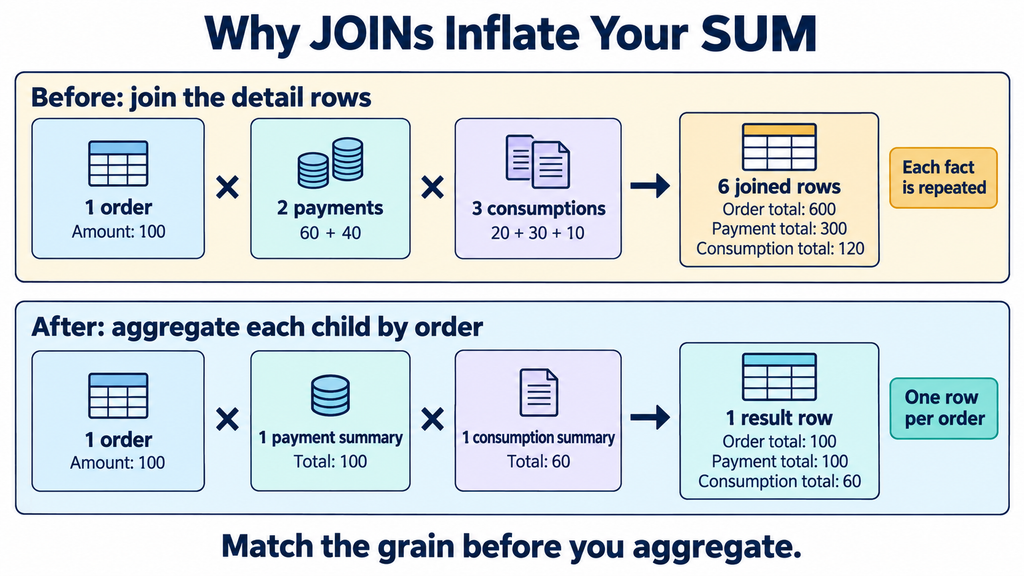
The multiplication signs describe row counts, not multiplication of monetary amounts.
The outer query no longer needs GROUP BY. Each joined summary already has the required grain.
COALESCE converts a missing child summary into zero. In this report, that is intentional: an order without payment records has a displayed payment total of zero.
The source amount columns are NOT NULL. If a real system uses NULL to mean an unknown amount, decide how to surface that condition rather than automatically treating incomplete data as zero.
This solution is appropriate because the requested output is an order summary. A report that genuinely needs payment-level or consumption-level detail should retain that detail and avoid repeatedly summing parent measures over it.
Test Equal Amounts and Missing Child Records
Run this additional data script once, after the initial setup:
-- Run once, after 01-setup.sql.
-- Order 2: equal payment amounts must remain separate facts.
-- Order 3: no child records.
-- Order 4: payment only.
-- Order 5: consumption only.
INSERT INTO demo_orders VALUES
    (2, 100.00), (3, 80.00), (4, 70.00), (5, 90.00);
INSERT INTO demo_payments VALUES
    (13, 2, 50.00), (14, 2, 50.00), (15, 4, 70.00);
INSERT INTO demo_consumptions VALUES
    (24, 2, 10.00), (25, 5, 15.00), (26, 5, 25.00);
Run the fixed query again. It should return:
| id | order_amount | paid_amount | consumed_amount |
|---|---|---|---|
| 1 | 100.00 | 100.00 | 60.00 |
| 2 | 100.00 | 100.00 | 10.00 |
| 3 | 80.00 | 0.00 | 0.00 |
| 4 | 70.00 | 70.00 | 0.00 |
| 5 | 90.00 | 0.00 | 40.00 |
These rows verify several boundaries:
- Order 2 has two legitimate payments of the same amount.
- Order 3 has no child records and remains in the output.
- Order 4 has a payment but no consumption.
- Order 5 has consumption but no payment record in this fixture.
The last case tests query behavior with an incomplete payment history; it is not a proposed business rule permitting unpaid service.
Now demonstrate the DISTINCT trap:
SELECT o.id,
       SUM(p.paid_amount) AS paid_amount,
       SUM(DISTINCT p.paid_amount) AS distinct_amount
FROM demo_orders AS o
JOIN demo_payments AS p ON p.order_id = o.id
WHERE o.id = 2
GROUP BY o.id;
The output for order 2 is:
| id | paid_amount | distinct_amount |
|---|---|---|
| 2 | 100.00 | 50.00 |
Even without the second child join, DISTINCT removes one valid 50 payment.
The order table contains an analogous counterexample. Orders 1 and 2 both have an amount of 100. Summing distinct order amounts across all five orders gives 340, while the actual order total is 440.
Equal amounts are common business data. They cannot serve as unique record identifiers.
Calculate Grand Totals from One Row per Order
Once the report has one row per order, a second aggregation can safely produce overall totals:
SELECT COALESCE(SUM(x.order_amount), 0) AS order_amount,
       COALESCE(SUM(x.paid_amount), 0) AS paid_amount,
       COALESCE(SUM(x.consumed_amount), 0) AS consumed_amount
FROM (
    SELECT o.id, o.order_amount,
           COALESCE(p.paid_amount, 0) AS paid_amount,
           COALESCE(c.consumed_amount, 0) AS consumed_amount
    FROM demo_orders AS o
    LEFT JOIN (
        SELECT order_id, SUM(paid_amount) AS paid_amount
        FROM demo_payments GROUP BY order_id
    ) AS p ON p.order_id = o.id
    LEFT JOIN (
        SELECT order_id, SUM(consumed_amount) AS consumed_amount
        FROM demo_consumptions GROUP BY order_id
    ) AS c ON c.order_id = o.id
) AS x;
With the expanded fixture, the result is:
| order_amount | paid_amount | consumed_amount |
|---|---|---|
| 440.00 | 270.00 | 110.00 |
The outer COALESCE expressions also make an entirely empty report return zeros.
If the application needs both a paginated list and a grand total, calculate the total over the complete qualifying order set, not merely the current page.
Any amount-based filtering must be applied consistently to that set. For example, “only orders with consumption above 20” should filter the order summaries before pagination and before computing the corresponding report total.
Use EXISTS When the Child Table Only Determines Eligibility
Sometimes the report needs the total order amount for orders that have any consumption record. It does not need consumption details or their sum.
Use an existence predicate:
SELECT COALESCE(SUM(o.order_amount), 0) AS qualifying_order_amount
FROM demo_orders AS o
WHERE EXISTS (
    SELECT 1
    FROM demo_consumptions AS c
    WHERE c.order_id = o.id
);
For the expanded dataset, qualifying orders are 1, 2, and 5:
100 + 100 + 90 = 290The total consumed amount for those orders is 110. These are different measures answering different questions.
EXISTS checks whether a matching row exists without adding those child rows to the outer result. MySQL EXISTS and NOT EXISTS subqueries
It is a good semantic fit for eligibility checks, not a blanket performance promise.
If eligibility depends on net consumption after reversals, the existence of one positive record is insufficient. Calculate the required net measure before deciding eligibility.
Add Real-World Filters at the Correct Level
The reproduction intentionally has no status or time filters. A production report will need them, but their placement changes meaning.
For example, a payment summary for a particular period should filter payment facts before grouping:
-- Illustrative extension: these fields are not in the demo schema.
SELECT order_id, SUM(paid_amount) AS paid_amount
FROM payments
WHERE payment_status = 'SUCCEEDED'
  AND paid_at >= :period_start
  AND paid_at <  :period_end
GROUP BY order_id;
Here the named parameters are application-level placeholders.
A consumption summary may use a different validity rule and a service-completion timestamp. Do not assume that the payment and consumption windows should share one timestamp.
Also distinguish filtering child facts from filtering parent eligibility. Adding a condition on a child column in the outer WHERE clause can reject the NULL-extended rows that LEFT JOIN was intended to preserve.
If the report should retain unpaid orders, filter valid payments inside their summary. If it should show only orders with successful payments, express that eligibility requirement deliberately.
For multi-tenant systems, preserve the tenant boundary in joins, grouping keys, and filters. If order IDs are unique only within a tenant, grouping solely by order_id can merge unrelated orders.
Correctness and Performance Need Separate Checks
Pre-aggregation repairs the logical grain. It does not prove that the resulting query is the fastest available implementation.
A small page of orders may not justify aggregating every historical payment and consumption record. Evaluate restricting child aggregation to the qualifying order set, or another lookup strategy suited to the workload.
Inspect existing indexes on the relationship and filtering columns. An index can reduce access cost; it cannot fix an incorrect sum.
MySQL may merge or materialize derived tables, and aggregation affects which transformations are available. Review the actual plan rather than assuming a particular execution strategy from the SQL layout. MySQL derived-table optimization
For representative data, compare row counts entering the joins and aggregation, child-table access, and end-to-end execution time.
No performance improvement is claimed for this tutorial. The numeric fixture demonstrates correctness, not a benchmark.
What Was Verified
The accompanying package includes the SQL files in execution order and a Python verifier using an isolated SQLite database.
The verifier checked:
- The original incorrect totals: 600, 300, and 120.
- The exact six payment/consumption pairs.
- The repaired baseline totals: 100, 100, and 60.
- Equal payment amounts and all missing-child combinations shown above.
- Both DISTINCT counterexamples.
- EXISTS eligibility totaling 290.
- Grand totals of 440, 270, and 110.
- Per-order reconciliation against independent child-table sums.
- An empty dataset.
These semantic checks passed. The SQL examples target MySQL-compatible syntax, but they were not executed against a MySQL server in this environment. SQLite verification does not validate MySQL execution plans or its DECIMAL arithmetic; the fixture uses whole currency amounts and does not test rounding.
To reproduce in MySQL, run 01-setup.sql in a fresh database, followed by the incorrect, inspection, and fixed queries. Then run 05-edge-data.sql once and repeat the fixed query before running the remaining examples. Keep the SQL files separate from the Python verifier, which always creates its own in-memory fixture.
A Practical Rule for Reviewing SUM Queries
Before accepting a financial or operational summary, identify what one row represents at each stage.
Then ask:
- Is every measure still present once per underlying business fact?
- Can another child join repeat it?
- Should this relationship return details, a summary, or only an existence result?
- Do the final totals reconcile to independent source queries over the same scope?
If a value belongs to an order, do not sum repeated copies of it across payment-and-consumption combinations. If a report needs one row per order, make the child inputs conform to that grain before joining them.
That is how an order worth 100 stays worth 100.